

Key Takeaways
CDS Views play a central role in modern SAP data architectures. They provide business-ready SAP data through a semantic layer, creating an important foundation for selective SAP data integration. This article explains what CDS Views are, why they matter for Clean Core and SAP data extraction, and which access methods Xtract Universal.iQ provides for different integration scenarios.
SAP Data Extraction Starts with the Right Data Source
In many organizations, SAP data is the foundation of critical business processes. But its value no longer ends inside the SAP system. Relevant SAP data must also be available outside the SAP landscape for analytics and reporting, modern data warehouses and lakehouses, cloud platforms, and AI applications.
SAP data extraction therefore begins with an obvious question: How can the required data be moved reliably from SAP to the target environment?
For a sustainable data architecture, however, this question alone is not enough. It is equally important to determine the layer at which the required data is provided. The chosen data source and access method affect how the data is structured, how efficiently changes can be processed, and how closely the integration is coupled to the technical structure of an SAP system.
The strategic evolution of the SAP landscape adds another dimension. With the Clean Core approach, the transition to SAP S/4HANA, and the growing use of cloud environments, a clearly defined and stable access layer is becoming increasingly important. When planning new data integration scenarios, organizations should therefore consider more than their current data requirements. Future SAP updates, migrations, and changes to the system architecture should also be accommodated with minimal additional effort.
This is where SAP CDS Views come into play. They provide access to business-defined SAP data models while abstracting the underlying table structures, making them an important foundation for modern SAP data integration and analytics scenarios.
What Are SAP CDS Views?
CDS stands for Core Data Services. CDS Views are data models in the SAP application layer that provide a semantic layer over the underlying SAP data. They can also incorporate business logic, enabling data to be provided in a business context independently of the raw structures of the underlying database tables. In simple terms, CDS Views do more than make data technically available: they prepare it within a defined business context.
This is a key difference from looking directly at individual SAP tables. The information required for a specific business process is often not stored in a single table. Master and transactional data, for example, may reside in different tables. An analysis of purchase order data may therefore require information from multiple technical structures.
A CDS View can combine this information, select the required fields, and model relationships between the data. Metadata and annotations can also be used to describe the business meaning of the provided data and how it should be used.
In simple terms, the difference can be summarized as follows:
An SAP table stores data in a technical structure. A CDS View provides the required SAP data in a defined business context.
What Role Do CDS Views Play in Data Extraction?
For data extraction, CDS Views provide a defined access layer in the SAP application layer. They do not exist as additional data records alongside the actual SAP data, nor do they directly access the database in the architecture discussed here. Instead, they are part of the SAP application layer and abstract the underlying technical data structures. This makes CDS Views particularly valuable for applications, analytics, and reporting: Users can access a defined data model without having to interpret the underlying tables and their relationships for every use case.
CDS Views are an SAP-specific technology. They are not a universal data model for different ERP systems, but rather part of the SAP architecture.
Note:
CDS Views are not limited to SAP S/4HANA. ABAP CDS has been available since SAP NetWeaver AS ABAP 7.40 SP05 and can therefore also be used in SAP ECC 6.0 EHP7 and later systems with the appropriate support package level. SAP S/4HANA also includes a large number of standard CDS Views for different use cases, and SAP continues to expand them with every release. As a result, organizations can use existing data models for many scenarios instead of developing their own custom CDS Views. Theobald Software also supports organizations with technical expertise, best practices, and support when evaluating existing table-based extraction scenarios and identifying suitable paths toward CDS Views.
How Do CDS Views Work?
A CDS View can be understood as a defined view of SAP data. It specifies which data is required for a particular business purpose and how that data is related.
Within a CDS View, organizations can, for example:
- select fields from SAP data structures,
- combine information from different tables and other CDS Views using joins,
- model relationships and associations,
- filter or aggregate data,
- calculate or transform new fields,
- use parameters, and
- describe additional semantic information through annotations.
A simple example: An analysis requires both information from a business transaction and the related master data. In SAP, this information may be stored across several tables. A suitably modeled CDS View can combine the relevant information for this business use case.
A key benefit is the abstraction from the technical table structure: Downstream systems can access a business-defined data model without having to reconstruct the required SAP tables and their relationships. This creates a stronger separation between technical data storage and data consumption.
The Difference Between Standard CDS Views and Custom CDS Views
In general, a distinction is made between standard CDS Views provided by SAP and custom CDS Views created for customer-specific requirements.
Standard CDS Views already represent defined SAP business objects and use cases. If an existing standard CDS View meets the required data, relationship, and technical requirements, it can serve as the basis for the respective data integration scenario.
If the standard model does not meet a specific information requirement, a custom CDS View may be needed. Custom CDS Views allow a data model to be aligned more closely with customer-specific requirements.
The right choice does not depend only on whether the required fields are available. Filter and parameter requirements, the business structure, and the required delta capability also play a role. The section “Standard CDS View or Custom CDS View?” explains which CDS View is best suited to which use case.
For the actual data extraction, it is also important to distinguish between the data source and the access method: The CDS View defines the data model. How the data provided by the view is extracted and integrated from SAP is a separate architectural decision. Xtract Universal.iQ provides service types including CDSFlow and ODP OData, which are explained in more detail in the section “Which Access Methods Are Available for CDS Views?”.
Why Are CDS Views Relevant for SAP Data Extraction?
For data integration, the value of CDS Views is not limited to reading data from SAP. The key question is the layer at which access takes place and how dependent an organization is on the technical structures of the SAP system.
CDS Views combine several aspects that matter for modern SAP data architectures: They abstract technical table structures, provide data in a business context, and can support selective and delta-enabled data provisioning.
A Future-Ready, SAP-Compliant Architectural Approach
SAP systems continue to evolve. Updates, patches, migrations to SAP S/4HANA, and the growing use of cloud models also change the requirements for data integration. A sustainable architecture should therefore avoid unnecessarily tight coupling to the technical implementation details of the SAP system.
CDS Views support this approach by creating a defined semantic layer between the underlying tables and consuming applications. Data is provided through business-modeled structures, while the technical table layer moves further into the background.
This aligns with the Clean Core principle: Customer-specific dependencies on the SAP core should be reduced as far as possible so that enhancements, updates, and changes to the SAP system can be implemented with minimal additional adjustment effort.
However, SAP data integration requires an important distinction: A CDS View alone does not make data access SAP-compliant. What matters is how the data source, access method, and integration solution work together.
For CDS Views, Xtract Universal.iQ provides service types including CDSFlow and ODP OData for data extraction. Unlike the Table service, these two access paths do not require additional function modules to be installed in the SAP system. Especially in more standardized or cloud-oriented SAP landscapes, this can reduce SAP-side implementation effort and changes to the system. CDS Views are therefore relevant not only from a data-modeling perspective. They can provide the foundation for data integration scenarios that are more closely aligned with the future development of the SAP architecture.
This perspective is also relevant for organizations that still use table-based, DataSource-based, or partially report-based extraction scenarios. The objective does not have to be the wholesale replacement of existing approaches. Instead, organizations should assess which scenarios can be represented through suitable CDS Views in the future. Theobald Software already supports organizations with technical expertise and best practices when evaluating existing extraction scenarios and potential migration paths to CDS Views. This support is also intended to expand through appropriate tooling in the future.
Business Context Instead of Isolated Tables
Direct table access initially provides the data stored in the respective technical structure. However, a single table is often not sufficient for a business use case.
For example, analyzing a business process may require transactional data, master data, and supplementary information from different SAP structures. Outside SAP, the consuming system would need to know which tables are required and how their data relates from a business perspective.
CDS Views can already model part of this logic on the SAP side. They can combine data through joins, select the required fields, and define relationships and associations.
For downstream analytics or data platforms, this means that they receive more than isolated technical structures. They can access a business-defined data model, keeping SAP-specific modeling logic closer to the place where the business context of the data is understood.
More Targeted Data Provisioning
Not every use case requires all the information in an SAP table. A report, dashboard, or specific analytics use case often requires only a defined subset of the available data.
CDS Views can help align data provisioning with this requirement. The required fields can be selected, data from different structures can be combined, and filters and parameters can be applied to the specific scenario.
This can reduce the volume of data transferred and make it more relevant to the business use case. This is particularly useful in scenarios where SAP data must be updated frequently in downstream systems.
CDS Views are not automatically “better” than table access. Direct table access or CDC-based methods can still be appropriate for specific data volumes and use cases. The determining factor is which data is required and which extraction method best meets the requirements.
Delta Processing Instead of Repeated Full Loads
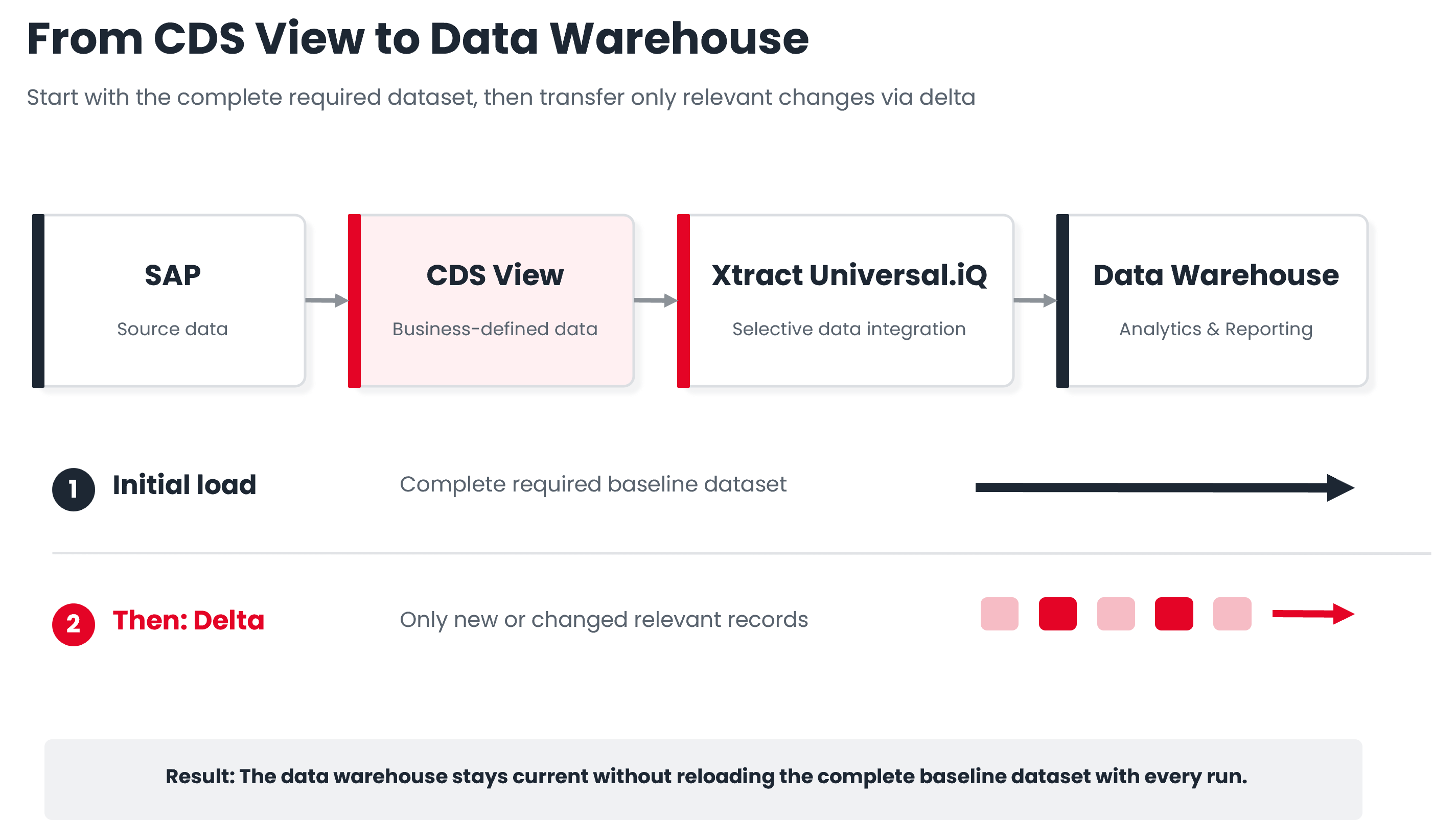
Another important aspect is the processing of changes. During the initial load, the required records are first transferred in full to the target system. If individual data records subsequently change in SAP, repeatedly transferring the complete dataset is often inefficient for regularly scheduled integration processes.
This is where delta scenarios come into play: New or updated records, for example, can be transferred selectively. Depending on the specific scenario, the handling of deletions in the target system must also be considered.
It is important to note that not every CDS View is automatically delta-enabled. Whether a delta method can be used depends on the CDS View and its configuration or exposed properties. If a standard view does not include a delta definition, it may be possible to add one through a custom view built on top of it. Whether this is possible depends on the data structure of the view. The next important step is therefore to determine which standard or custom CDS View is appropriate for the specific scenario and which criteria should be evaluated.
Governance and Authorizations
In addition to performance and data freshness, governance and security play an important role in SAP data extraction. Organizations must be able to understand which data is provided from SAP, in which form, and who is permitted to access it.
CDS Views can be integrated into the SAP authorization concept. Access controls can determine which data a user is allowed to view. Together with the business-defined data model, this creates a clearly scoped and transparent data source.
Whether and how authorization checks apply depends on the CDS View and the permissions of the SAP user used for extraction. The authorization concept should therefore be considered from the outset when selecting the CDS View and configuring the extraction scenario.
Standard CDS View or Custom CDS View?
Organizations that want to provide SAP data through CDS Views do not necessarily have to develop a new data model. SAP provides standard CDS Views for numerous business objects and use cases. These views should therefore be the first point of reference when mapping an existing or new data integration scenario through CDS Views.
The key question is not simply whether a suitable CDS View exists, but whether it meets the business and technical requirements of the specific use case. These requirements include which data and fields are needed, how they must be related, and whether the data must be processed in full or as a delta.
A standard CDS View is particularly suitable when it already represents the required business data model. If the standard model is not sufficient, a customer-specific custom CDS View may be required.
The following questions should be considered when selecting a CDS View:
- Does the CDS View contain all data and fields required for the use case?
- Does it represent the required business relationships between the data?
- Are the required filters and parameters available?
- Does data provisioning need to account for specific selection criteria?
- Is delta extraction required, and does the CDS View support the scenario?
- Can the use case be represented by an existing standard CDS View, or is an individual extension or custom CDS View required?
The key principle is that a custom CDS View is not automatically the better or more flexible choice. If an SAP-provided standard CDS View meets the requirements, it can be used without creating an additional customer-specific data model. A custom CDS View becomes relevant primarily when the specific information requirement goes beyond the available standard models.
From Existing Extraction Scenarios to the Right CDS View
This decision becomes particularly relevant for organizations that already provide SAP data through other SAP objects or established extraction logic.
An existing scenario may, for example, be based on several tables. The key question is not simply: Which CDS View replaces Table A? Instead, the business scenario as a whole must be considered: Which information is currently obtained from which SAP objects, how is it combined, and for what business purpose is it required?
For a scenario that currently combines information from multiple tables, a suitable standard CDS View may already represent the required business data model. If not, organizations must assess how the requirements can be implemented through a custom CDS View.
Looking at the business scenario rather than individual technical tables is also essential when migrating toward a CDS View-based architecture. The objective is not to recreate existing technical access methods one-to-one. Instead, organizations should identify the CDS-based data model that can meet the same business information requirement.
Support on the Path to CDS Views
For existing extraction scenarios, mapping to suitable CDS Views can be challenging. Organizations may know which tables, DataSources, or reports they use today for a specific use case, but they first need to derive the appropriate CDS-based data model.
Theobald Software is exploring how customers can also receive tool-based support when transitioning existing extraction scenarios to a CDS View-based architecture. The goal is to analyze existing extractions and, where possible, map them to suitable standard CDS Views. If no existing standard CDS View fully meets the business information requirement, customer-specific CDS Views could provide the necessary extension. The creation of custom CDS Views is also intended to be considered. The objective is to make potential migration paths more transparent and help organizations transition existing SAP data access scenarios to CDS View-based approaches.
Selecting a suitable CDS View defines which data is provided and in what structure. The separate question is how this data is extracted from SAP. Xtract Universal.iQ provides different service types for this purpose.
Which Access Methods Are Available for CDS Views?
Once the appropriate CDS View has been identified, the next question is how the data defined in that view is made available from SAP for further use. The CDS View and data extraction represent two separate layers.
Xtract Universal.iQ provides different service types for accessing CDS Views. Which service type can be used initially depends on the SAP source system and the properties of the respective CDS View. CDSFlow and ODP OData are particularly relevant for CDS View-based scenarios. In certain cases, such as SAP ECC sources or CDS Views that do not meet the technical requirements for CDSFlow, access can be provided through the Table service type.
The appropriate option therefore depends on more than the selected CDS View. The SAP landscape, performance and throughput requirements, the required update frequency, and SAP-side prerequisites all influence the decision.
The CDS View Is the Data Source, Not the Access Method
CDS Views, delta processing, ODP OData, and extraction solutions can easily be conflated. For the architecture, however, it is important to distinguish the individual layers: The CDS View defines which data is provided and in what business structure. The access method determines how that data is extracted from SAP.
A simple example: A CDS View can combine selected product data from different SAP structures into a business-defined data model. This first defines which information is available.
It does not yet define how an external system reads this data model and transfers it, for example, to a data lake. This requires a suitable service type.
This distinction also matters for delta processing. As explained above under “Delta Processing Instead of Repeated Full Loads,” the CDS View must meet the prerequisites for the respective delta scenario. The selected service type then handles access to and transfer of the available data. Xtract Universal.iQ provides CDSFlow and ODP OData, among others, for this purpose. Unlike RFC-based ODP access, which SAP prohibits for third-party providers in SAP Note 3255746, ODP OData is an SAP-designated access method.
CDSFlow: Selective, High-Performance Access to CDS Views
CDSFlow is a service type in Xtract Universal.iQ developed specifically for accessing CDS Views. It supports extraction from standard and custom CDS Views and enables the data required for a use case to be provided selectively.
The required data fields and filters of the CDS View can be applied to the integration. If the underlying CDS View supports the relevant delta scenario, changes can be processed efficiently and selectively.
A key consideration for the SAP-side architecture is that CDSFlow does not require additional function modules to be installed in the SAP system. This keeps SAP-side changes to a minimum, supports a Clean Core-oriented architectural approach, and is especially relevant for SAP Public Cloud.
CDSFlow is therefore particularly relevant for scenarios in which SAP data must be provided selectively and with high performance from CDS Views to downstream data platforms, and where stable delta processes are a central requirement.
CDSFlow Benefits at a Glance:
- Direct access to the CDS View layer
- Access to standard and custom CDS Views
- No additional function modules required in the SAP system
- Readout of relevant metadata
- Selective choice of required data fields and filters
- Use of the business logic defined in CDS Views
- Support for delta scenarios with suitable CDS Views
- High-performance, selective SAP data integration
- Structured data provisioning for analytics, reporting, and other integration scenarios
ODP OData: Standardized SAP Interface
ODP OData provides access to CDS Views through an established SAP standard interface. The service type is particularly relevant for scenarios in which organizations want to align their data integration with an interface technology designated by SAP.
ODP OData can also be used for CDS View-based data integration and delta scenarios, provided the relevant prerequisites are met. As with CDSFlow, no additional function modules need to be installed in SAP.
Compared with CDSFlow, data provisioning through ODP OData has its own technical conditions. These include SAP-side provisioning and configuration effort as well as limitations in performance and scalability. Theobald Software is therefore working on an innovative approach to advance ODP OData access, reduce existing technical limitations, and optimize performance for the relevant data integration scenarios.
CDSFlow or ODP OData: Which Access Method Fits Which Scenario?
CDSFlow and ODP OData pursue the same objective but take different technical approaches. Which service type is better suited to a specific scenario depends, among other factors, on performance requirements, delta processing, SAP-side setup, and the selected integration architecture. The following overview compares the key characteristics of both access methods.
| Criterion | CDSFlow | ODP OData |
|---|---|---|
| Technical access | Direct access to CDS Views via RFC or WebSocket RFC | Access through ODP OData as an SAP standard interface |
| Supported SAP objects | Focus on suitable standard and custom CDS Views | CDS Views and other SAP objects, such as ABAP tables and structures, BW extractors, BAPIs, InfoProviders, and DSO/aDSO |
| Delta processing | Supported for suitable CDS Views | Supported for suitable data sources |
| Additional function modules | Not required | Not required |
| Standard CDS Views | Supported | Supported |
| Custom CDS Views | Supported | Supported |
| SAP-side setup | No separate OData service required | Additional provisioning of the OData service required |
| Performance | Designed for selective, high-performance extraction and high throughput | Additional OData protocol overhead; performance depends on the specific scenario |
| Factors to consider | Volume, frequency, selectivity, delta | Existing SAP setup, OData provisioning, volume |
| Particularly suitable when … | Performance, selectivity, and delta are important | A standardized SAP interface is the primary requirement |
Practical Example: From a Product CDS View to the Data Warehouse
The interaction between CDS Views, delta processing, and the appropriate access method can be illustrated using product or material data.
Assume an organization wants to provide selected product data from SAP regularly in a data warehouse. There, the data is combined with additional information and used, for example, for analytics and reporting. It is therefore essential not only for the SAP data to be available in the target system, but also for changes in SAP to arrive efficiently and promptly. The example uses a data warehouse as the target. The same process applies to data lakes and lakehouses.
Step 1: Select the Appropriate CDS View
First, determine whether SAP already provides a standard CDS View that covers the required business information. The objective is not to extract as much SAP data as possible. What matters is that the CDS View provides exactly the information and relationships required for the specific use case. At the same time, verify that the CDS View is suitable for the planned delta scenario.
If an existing standard CDS View is not sufficient, determine whether the scenario can be represented through a custom CDS View.
Step 2: Provide the Initial SAP Data
Once the appropriate CDS View has been selected, the required data is first transferred in full to the data warehouse. This initial full load establishes the baseline dataset for subsequent processing. Xtract Universal.iQ accesses the CDS View through the service type selected for the scenario and provides the relevant data to the target platform. The data warehouse then contains a defined baseline dataset.
Step 3: Transfer Changes Through Delta Processing
After the initial load, the source data in SAP changes continuously. New products may be added, existing information may be updated, or records may be deleted. This is where delta processing comes into play: Instead of providing the complete baseline dataset again with every run, the delta scenario processes only changes that have occurred since the previous run. The downstream target system can then apply these changes accordingly.
How current the data is in the target system also depends on the selected execution interval. The shorter the intervals between delta runs, the faster SAP changes can be provided to the downstream system. With sufficiently short intervals, near-real-time scenarios can also be supported.
A simplified process is as follows:
- Initial data provisioning
- Change in SAP
- Delta determination
- Transfer of the change
- Update in the data warehouse
Step 4: Keep SAP Data Current and Use It Selectively
The decisive difference becomes visible during ongoing operation.
- Without delta processing, the required dataset would need to be provided repeatedly in full and processed again in the target environment.
- With delta processing, the process focuses on the relevant changes after the initial load.
This aligns data integration more closely with the actual information requirement: Instead of retransferring all previously known data with every run, the process handles only the changes required to update the target system.
The reduced volume of data to be transferred and processed can ease the load on both the source and target landscapes and shorten extraction and processing times. Depending on the target platform and use case, it can also reduce resource consumption and have a positive effect on operating costs.
This effect is particularly important in the target landscape: Instead of processing a complete dataset again with every run, the data warehouse can apply the relevant changes selectively. Combined with the regular delta runs described in Step 3, this enables efficient, current SAP data provisioning for analytics, reporting, and other data products.
At the same time, data provisioning remains business-defined through the CDS View and integrated into the existing data architecture through the selected service type.
CDS Views or Existing SAP Extraction Methods: What Should You Consider?
CDS Views play an important role in modern SAP data integration scenarios. They provide access to business-defined data models, support decoupling from technical table structures, and align with an SAP Clean Core-oriented architecture.
At the same time, existing SAP data integrations are often based on other data sources and service types. These include:
- Table: for providing information from SAP tables.
- Table CDC: for processing changes to table-based data through change data capture.
- DeltaQ: for scenarios based on SAP DataSources or classic BW extractors.
- Report: when data from existing SAP reports is needed for further use outside SAP.
- ERP Query and BAPI: for corresponding existing SAP data access and integration scenarios.
- BW-based access: when the required data or data models are already available in an SAP BW landscape.
In the long term, the key is not to preserve existing access methods unchanged, but to reassess the specific use case: If the required business information can be represented through a suitable CDS View, transitioning to a CDS View-based scenario can align data integration more closely with a modern SAP architecture.
However, not every existing access method can be migrated to a CDS View immediately or meaningfully. The available SAP object, business data requirement, delta requirements, SAP source system, and existing architecture must therefore still be considered. Migration should take place where it is technically feasible and makes sense for the customer scenario.
The strategic direction is clear: CDS View-based scenarios should be evaluated as the preferred option for new and existing integrations. Existing access methods remain relevant as long as a corresponding migration cannot be implemented in a technically or functionally appropriate way.
Conclusion: CDS Views as a Building Block for Future-Ready SAP Data Integration
CDS Views are much more than another way to access SAP data. They combine technical data provisioning with a business modeling layer and support an architectural approach in which organizations are less dependent on the underlying table structures.
For organizations that want to use SAP data outside SAP for analytics, reporting, data warehouses, or other applications, four key insights emerge:
1. CDS Views provide more than technical data access. They create a semantic layer over the underlying SAP data. Instead of accessing only individual technical structures, the required information can be combined in a business-defined data model and provided for the specific use case.
2. CDS Views are an important building block of modern SAP architectures. Abstracting the technical table structure supports a clearer separation between data storage and data consumption. CDS Views therefore align with a Clean Core-oriented architecture and provide a foundation for aligning data integration and analytics scenarios more closely with the strategic evolution of the SAP landscape.
3. The specific CDS View must fit the use case. Not every CDS View automatically covers every information requirement. Whether an existing standard CDS View is suitable or a custom CDS View is required depends on the required data, business relationships, filters and parameters, and delta-processing requirements.
For existing integration scenarios, it is therefore worth considering the business use case. The objective is not to reproduce existing table logic as closely as possible, but to identify the CDS-based data model that represents the required information appropriately.
4. The access method is also an architectural decision. Xtract Universal.iQ provides different service types for accessing CDS Views, including CDSFlow and ODP OData. CDSFlow is designed for high-performance, selective SAP data integration and stable delta processes. ODP OData provides a standardized SAP interface.
The appropriate approach depends in particular on performance and selectivity requirements, update frequency, delta strategy, SAP-side setup, and the relevant architectural guidelines.
CDS Views provide a business-defined foundation for making SAP data available outside SAP in a structured and targeted manner. They deliver the greatest value when the data model, delta strategy, and access method are consistently aligned with the specific use case. Xtract Universal.iQ brings these requirements together in SAP-compliant data integration and provides SAP data selectively for different target architectures.
At the same time, the data architecture remains flexible: The appropriate extraction method can evolve with changing requirements and the SAP landscape without requiring the downstream architecture to be rebuilt from the ground up. Xtract Universal.iQ supports different access methods, providing the freedom to adapt SAP data integration to future requirements without complex changes to the data architecture.
Would You Like to Use SAP Data Through CDS Views in Your Data Architecture?
Xtract Universal.iQ supports structured SAP data integration into cloud platforms, data warehouses, lakehouses, and other target environments.