

Xtract Universal.iQ
Integrate SAP data reliably into modern on-prem, cloud, and hybrid architectures.




SAP Integration for Cloud,
Hybrid, and AI Scenarios
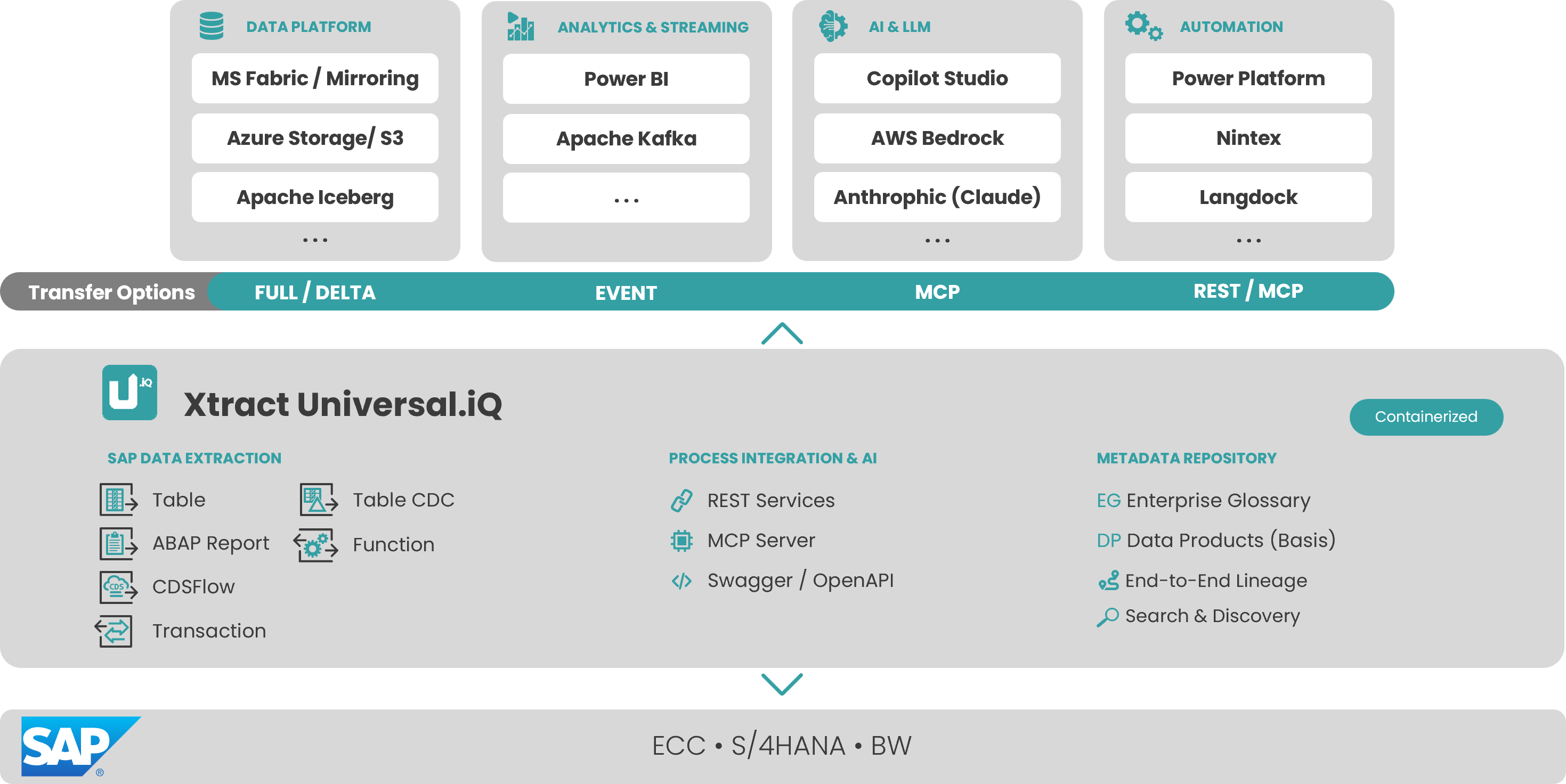
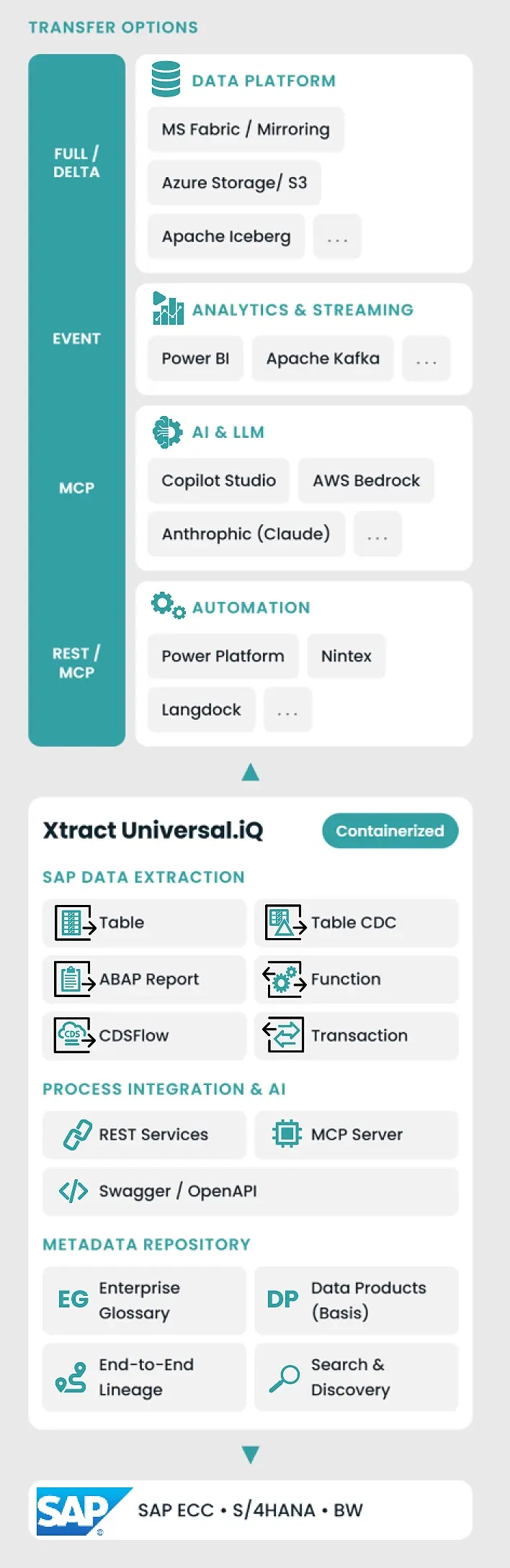
Xtract Universal.iQ was designed for modern IT architectures, data-driven analytics, and AI scenarios. The platform reliably brings SAP data into on-prem, cloud, and hybrid environments and enables both targeted writing back into SAP and process integration.
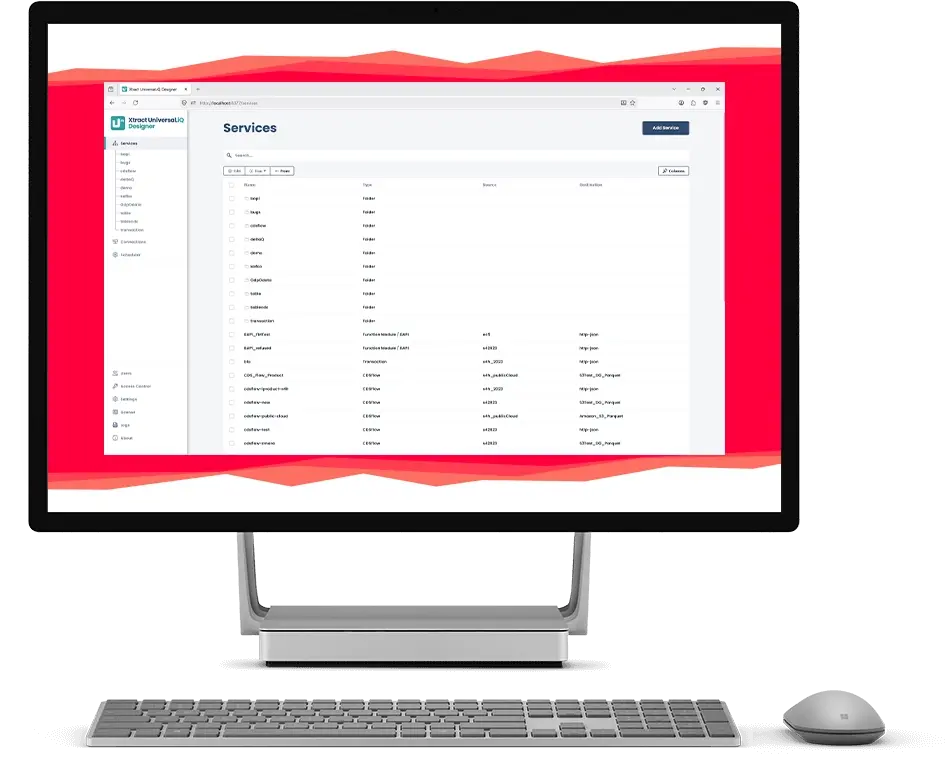
The no-code interface enables fast SAP data extraction without programming.
Containerized, web-based, and cloud-ready, Xtract Universal.iQ integrates flexibly into existing data platforms and infrastructure concepts – while maintaining full control over data, deployment, and operations. It forms the foundation for sovereign data architectures and data sovereignty.
An integrated, centralized metadata and terminology management system ensures structured SAP data extractions and reusable data products.
Challenges of Modern SAP Data Integration
Requirements for SAP data integration have shifted significantly in recent years:
- Cloud-only strategies exclude traditional, locally installed solutions
- Cloud and hybrid strategies require containerized, flexibly deployable architectures
- Operation, maintenance, and patch management of traditional server installations tie up unnecessary IT resources
- Analytics, data, and AI scenarios require SAP data quickly, structured, and automated
- Governance and compliance requirements demand full control over data and infrastructure
- Data integration must be flexible and ensure sovereignty over data and operations – also as a foundation for sovereign data architectures
Many existing integration approaches are too rigid, too complex, or not designed for flexibility.
The Solution: Xtract Universal.iQ for Flexible Data Integration
Xtract Universal.iQ is Theobald Software’s central platform for SAP data and process integration – usable in on-prem, private cloud, and future SaaS architectures.
The solution is based on many years of SAP integration experience and transfers proven extraction mechanisms into a modern, containerized, and web-based architecture.
Extract SAP Data and Write It Back in a Targeted Way
Xtract Universal.iQ combines data extraction and process integration in a single platform.
In addition to high-performance SAP data delivery, the solution also enables targeted writing back into SAP – for example via BAPIs, transactions, or MCP-based scenarios.
This means Xtract Universal.iQ covers both classic data flows and bidirectional SAP integration scenarios.
Flexible Deployment in Private Cloud and SaaS
Xtract Universal.iQ is offered as a Private Cloud Edition, which runs as a container in your own infrastructure or container runtime environments. A Public Cloud Edition (SaaS) is also planned, where hosting and lifecycle management are fully handled by Theobald Software.
Benefits of Xtract Universal.iQ

Proven Foundation
Existing logic and integration approaches from Xtract Universal are fully retained.

Cloud-native & AI-ready Architecture
Proven SAP mass data extraction for cloud-native architectures and AI scenarios.
Metadata-based Control
for structured and scalable data integration.
Additional Highlights
- Bidirectional SAP integration including targeted write-back and process-based SAP interaction
- Native support for modern data platforms and ecosystems
- Extended connectivity for cloud, data, and AI architectures
- Continuity of existing integration logic with ongoing evolution
- Scalable processing of large SAP data volumes for enterprise scenarios
- Foundation for AI-supported and data-driven applications

Use Cases: Typical Application Scenarios
Xtract Universal.iQ supports the provision and integration of SAP data in various architectural, analytics, and automation scenarios – from cloud environments to AI-driven applications.
- Cloud migration of SAP data: Provisioning SAP data for Azure, AWS, and hybrid architectures
- Analytics & BI: Continuous supply of reporting and analytics platforms
- AI and data science scenarios: Use of structured SAP data for forecasting and AI applications
- Governance-compliant integration: SAP integration with full control over data and infrastructure
- Process integration and automation: Integration of SAP into RPA and workflow scenarios including write-back
What Xtract Universal.iQ Can Do:


Efficient SAP Data Integration with CDSFlow
CDSFlow enables direct access to SAP CDS Views in S/4HANA Cloud and on-premise systems. Business data is extracted directly from CDS Views and provided in the target environment without additional installations in SAP or custom development. With delta support, only data that has changed since the last load is transferred after the initial load. This significantly reduces system load and enables high-performance, scalable data integration for modern analytics, reporting, and AI scenarios.


A world first in transaction automation
The Transaction Feature offers extended functionality compared to the classic SAP transaction recorder, which has significant limitations due to its technical features.
With the YunIO Transaction Feature, even more complex transactions can be called up and executed, such as personnel master data maintenance (PA30) and the execution of personnel measures (PA40). Transactions such as maintaining supplier master data (XK01) or incoming and outgoing goods (MIGO and MIRO) now also work without any restrictions.


Incremental SAP data loading: Fast & easy
This component is our champion when it comes to mapping data or changes in your SAP system in near real time and as easily as possible. Data from different data sources is integrated to consolidate all changes in one central system. Unlike a full data load, where all records in a table are transferred from the source to the target database, Table CDC captures only the changes to the data since the last load. This reduces the amount of data that needs to be transferred, resulting in faster and more efficient transfers. This ensures that you always have access to the latest and most up-to-date data, saving resources and time.


Extract SAP tables – fast, flexible, and effortless
Reliable, high-performance extraction of SAP tables (transparent tables, cluster tables, and views) is easier than ever before thanks to the Table component.
This component comes with our custom ABAP package for table extraction but also supports standard SAP function modules. What´s more, joining SAP tables prior to extraction via Open SQL statement is also possible. This replaces the need for manually creating views or SAP queries on the SAP side.


Call BAPIs and RFC function modules with ease
With the BAPI component, it is possible to call BAPIs and RFC function modules. At the same time, the component can be used as both the data source and - depending on the Xtract product - the target data (write-back). Users can extract or populate the BAPI’s import/export and table parameters.


Use ABAP reports as a data source
This component makes it possible to use ABAP reports as a data source. This guarantees the extraction and thus continued use of existing, customer-specific ABAP reports or of standard reports provided by SAP. Users can simply adopt existing reports and their respective business logic instead of wasting time to recreate them outside of SAP.
Core Functions and Technical Highlights
- Modern, web-based user interface with a clear user experience
- No-code configuration of SAP extractions
- Recording and automation of SAP transactions without SAP GUI (directly in the designer)
- Delta and CDC mechanisms for efficient data transfer
- Container deployment: flexible target systems (data lakes, data warehouses, BI, analytics and AI platforms, AI agents, and LLM applications)
- Central metadata and terminology management for SAP data extractions
- Foundation for reusable data products from SAP data
- MCP (Model Context Protocol) compatibility as a bridge to AI and LLM applications
Test Xtract Universal.iQ Free for 30 Days


Frequently Asked Questions

Still Have Questions?
The Help Center provides detailed information and answers to common questions.
If you want to experience the platform directly, you can request a demo. Support is available for individual requirements and use cases.