.svg)

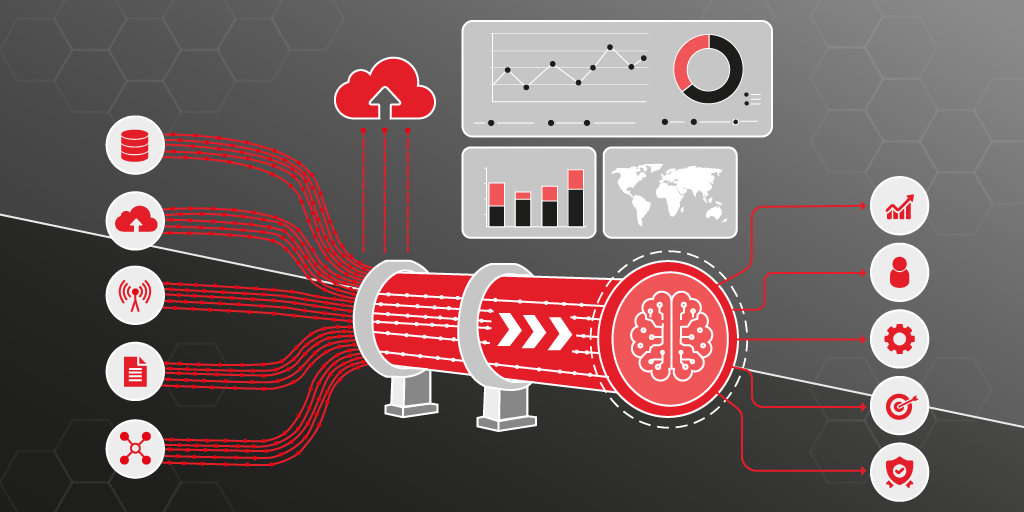
The sales team needs up-to-date revenue figures. IT exports the relevant data from SAP, someone transfers it into a spreadsheet, and a report is built from that. By the time it's ready, the numbers are already out of date. And somewhere, the next export is already running.
The problem isn't SAP. SAP does its job: it processes orders, maintains customer data, and posts revenue, reliably and in real time. The problem lies in what comes after. How does that data get out of SAP and into the systems the business uses every day, while still arriving current? As long as the answer is "manual export, script, waiting queue," reporting remains a bottleneck. Decisions are based on stale data — from yesterday or even last week. And IT spends its time keeping extraction processes running. Real value? Nowhere to be found.
This article shows how a Medallion Pipeline in Microsoft Fabric resolves this bottleneck, and explores the technical and organizational aspects involved.
Two Paths to Fabric — and Why This Article Focuses on One
Microsoft Fabric offers two fundamental approaches to making SAP data continuously available. Both rely on OneLake as the central data storage solution, a unified environment that brings all enterprise data together.
The first path is via Open Mirroring. Using a delta-capable SAP interface — such as Xtract Universal.iQ — incremental changes from SAP are automatically replicated into Delta tables in OneLake. SAP data can then be seamlessly combined with other enterprise data and used for near-real-time analysis, without the need for complex transformation logic upfront.
This article focuses on the second path: the pipeline-based approach using a Medallion Architecture. This approach is particularly suited when SAP data doesn't just need to be transferred, but also structured, enriched, and transformed into actionable business objects along the way. Combined with a delta-capable SAP interface, only changed records are processed, rather than moving the entire dataset with every run. This keeps the volume of processed data manageable, regardless of how large the underlying SAP tables are.
The Principle
Traditional data integration runs on a strict schedule: nightly batches, hourly exports, fixed time windows. Between runs, reports are already out of date — not because the technology couldn't do better, but because the process is built that way.
A different approach is Change Data Capture (CDC). Instead of regularly transferring the entire dataset, only the records that have actually changed since the last run are passed on — new entries, updates, and deletions. This not only significantly reduces the volume of data transferred, but also creates the foundation for something far more important: data freshness.
Combined with Microsoft Fabric, the pipeline doesn't run on a clock — it runs on events. That means it's triggered automatically as soon as new data arrives. A sales order created in SAP at 2:00 PM is visible in the Power BI dashboard moments later. Not the next morning.
There's another benefit: because only changed records are processed, processing costs in Microsoft Fabric remain manageable — in contrast to approaches that move the entire dataset with every run.
Why Not Just Use the Native ADF Connector?
Microsoft provides its own integration solution through the SAP connector for Azure Data Factory (ADF), and for many scenarios, it's a reasonable starting point. But looking more closely reveals limitations that become significant in practice.
The ADF connector for incremental SAP extraction is based on SAP's ODP framework (Operational Data Provisioning). SAP has tightened access to this framework for third-party tools since June 2026. The consequence: ODP-RFC calls are now blocked. For companies that have built their incremental data extraction on the native ADF connector, this is a risk that will require action in the medium to long term.
There's also a structural limitation: the CDC capabilities of the ADF connector are not natively available in Microsoft Fabric Data Factory. Anyone looking to implement incremental SAP extraction directly in Fabric needs either a workaround using ADF as an upstream layer, or an alternative solution.
Xtract Universal.iQ takes a different approach: extraction happens directly via SAP-side function modules, independent of the ODP-RFC framework and writes the results as Parquet files directly into OneLake. No ODP risk, no additional ADF layer, no dependency on Microsoft's SAP connector roadmap.
Learn more about the ODP alternative
The Journey from SAP to Power BI
To not just transfer SAP data, but progressively transform it into actionable business insight, the pipeline-based approach follows the Medallion Architecture — a proven structural principle for modern data pipelines in Microsoft Fabric. Data passes through three sequential layers before arriving as a finished report in the dashboard. This Bronze-Silver-Gold layer structure is the core of every Medallion Architecture.
Bronze Layer: the unaltered SAP mirror
This is where SAP data lands first. Unchanged and complete, as an exact replica of the source tables. No transformation, no interpretation. The Bronze Layer is the reliable, always-current mirror of the SAP system and forms the foundation for every subsequent step.
Silver Layer: from tables to business objects
In the Silver Layer, technical SAP tables become understandable business entities: a customer is a customer, a sales order is a sales order — cleansed, consolidated, and in a form the business immediately recognizes.
Gold Layer: reporting-ready metrics
The Gold Layer delivers data in exactly the aggregated form the dashboard needs: revenue per customer, daily sales figures, trend lines. This is where raw material becomes a finished analytical result.
Configuration Instead of Code: New Tables with a Single Entry
A central configuration file controls which SAP tables are included in the pipeline and how the data should be structured and merged. This Medallion pipeline is entirely configuration-driven: If a new SAP table needs to be integrated, a single entry in this file is all that is required. No adjustments to the pipeline by the development team are necessary, nor are any code changes required.
This has a practical effect that goes beyond the technical: IT shifts from bottleneck to enabler. New data sources can be integrated quickly, without every extension becoming its own project.
What happens in the background runs entirely automatically and in sync. Extraction and transformation work seamlessly hand in hand. As soon as new or changed data arrives from SAP, not just the extraction is triggered — the entire pipeline runs through until the result is available in the dashboard. No separate scheduling required, no manual coordination between extraction and transformation. Whoever needs the data simply finds it there — current, without having to wait for anyone to kick off the process.
The Overlooked Edge Case: What Happens When Something Gets Deleted?
Many integration approaches focus on the obvious: transferring new records and updating existing ones. What's easily overlooked: what happens when something gets deleted in SAP?
Consider this example: a customer is removed from the SAP system because they were created as a duplicate, are inactive, or data maintenance requires it. Without explicit handling, that customer would simply live on in the dashboard — in revenue analyses, customer lists, and trend reports. The numbers look consistent but are no longer accurate.
The pipeline accounts for exactly this case: deletions from SAP are detected and automatically propagated through all downstream layers. The Bronze Layer remains an accurate mirror of the current SAP state, not an ever-growing log of outdated information.
Not a headline feature. But one that makes the difference between a dashboard you trust and one you feel the need to double-check.
From Data Model to Live Dashboard
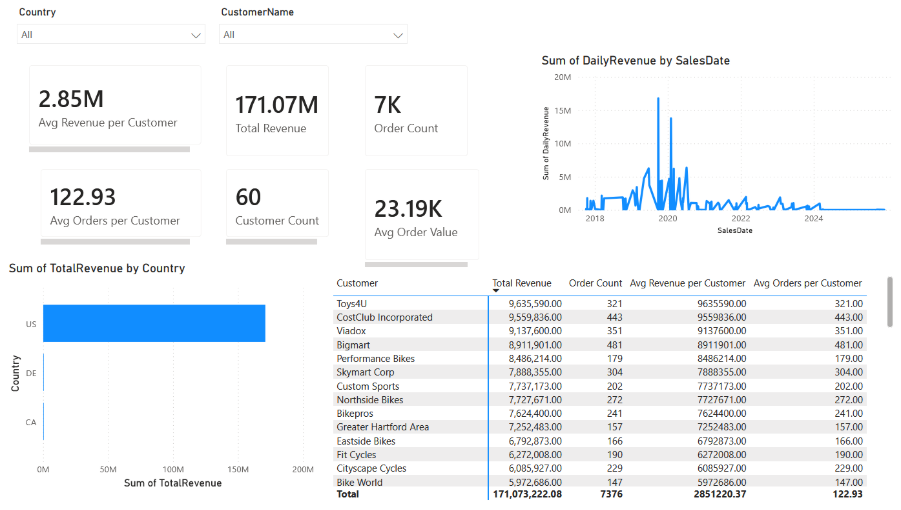
At the end of the pipeline is not a pile of data, but a finished Power BI report fed from the Gold Layer, which already delivers data in exactly the form reporting needs. Metrics are centrally defined: revenue per customer, daily sales figures, period comparisons. One definition, valid everywhere. No report calculates anything differently than another.
What this means in practice is illustrated by two concrete analyses that are part of the demo setup:
Top Customers by Revenue: Which customers generate the most revenue? The answer is available at any time, without anyone having to trigger an export or merge tables. When an order changes in SAP, the dashboard follows.
Daily Sales Trend: How do sales develop throughout the day? Seasonal fluctuations, short-term outliers, and current developments are visible as they happen, not only when the next report is generated.
The difference from the previous workflow isn't just a matter of speed. It's about reliability: instead of waiting for a manually assembled export that's already outdated by the time it arrives, you open a dashboard and trust what you see.
What This Means in Practice — for Business and IT
A Look Under the Hood
If the business perspective is what you're after, the previous sections have you covered. This section is for those who want to understand what's technically happening behind the scenes.
For those who want to know specifically how to configure a Microsoft Fabric pipeline for incremental SAP data capture, transformation, and reporting using the Medallion Architecture, we recommend checking out the article in our HelpCenter.
Landing Zone & Bronze Layer
A delta-capable SAP interface (TableCDC in the demo setup) extracts changes directly from SAP and writes them as Parquet files into a Medallion Lakehouse Architecture in Microsoft Fabric — specifically the Lakehouse landing area, structured according to the schema Files/incremental/<TableName>/. Each extraction run generates a new, timestamp-based file — existing files are never overwritten. Each file contains an incremental batch: inserts, updates, and deletes from SAP.
A Copy Data Activity then loads the Parquet files via upsert into Bronze Delta tables — one table per SAP source. Processed files are subsequently archived and removed from the landing area, ensuring each file is processed exactly once.
Configuration
A central pipeline-config.json defines three parameters per SAP table: the landing folder (FolderName), the name of the target Delta table (TableName), and the key columns for the upsert merge (KeyColumns, always including MANDT as the SAP client identifier). Onboarding a new table means adding a JSON entry, no pipeline changes.
Orchestrator & Child Pipeline
The orchestrator is a Microsoft Fabric pipeline that reads the configuration file via a Lookup Activity, iterates over all table entries using ForEach (parallel), and invokes a child pipeline for each table. Once all Bronze tables have been updated, the orchestrator triggers a notebook that builds the Silver and Gold layers.
The child pipeline runs once per table: it lists available Parquet files via Get Metadata Activity, sorts them chronologically, and processes them one by one in an inner ForEach — Copy Data (Upsert) → Archiving → Notebook step for deletes.
Explicit Delete Handling
The Copy Data Activity in upsert mode supports only inserts and updates, deletions cannot be processed directly. SAP CDC extracts signal deletions via a delete flag in the record. A dedicated notebook (nb clean deleted rows) reconciles the Bronze Delta table against this signal after each Copy Data step and removes the corresponding rows. Result: Bronze remains an accurate snapshot of the current SAP state — not an append-only log.
Silver & Gold
In the second part of the Medallion Pipeline, a single notebook (nb transform sales analytics) builds the Silver and Gold layers once all Bronze loads are complete. Silver conforms the raw data into business entities (Customer from KNA1, SalesOrder from VBAK + VBAP). Gold aggregates these into reporting-ready tables (CustomerRevenue, DailySales).
Semantic Model
A Power BI Semantic Model sits directly on top of the Gold Layer and centralizes business logic: DAX measures for total revenue, revenue per customer, and period-over-period trend analysis are defined once and available across all reports. No distributed logic, no diverging calculations.
Conclusion
A delta-capable SAP interface, combined with a configuration-driven Fabric Medallion Pipeline, turns outdated SAP exports into a reliable, automatically updated live dashboard, without manual intervention, batch windows, or IT bottlenecks.
The setup described here is not a theoretical concept, it's a working demo built on real SAP sales and customer data. If you'd like to see it in action, feel free to request a demo. We'll show you how the pipeline runs and what the result looks like in Power BI.